2017年6月28日水曜日

Studio One 3.5.1リリース|スタジオワンの更新情報

取り急ぎ
2017.6.27に、Studio One Version 3.5.1がリリースされました。

バーチャルインストゥルメントのレイテンシやCPU負荷のあたりをさらに改善(修正?)した様子。
Tape 64bit対応。なお、64bitとはオーディオエンジンのことなので、アプリが64/32ビットかどうかは関係なかったです。念のため。
アンドロイド用のStudio One Remote出ました。
外部デバイスからのコンソール調整は履歴に反映していなかったんですね?これが反映するように改善。

テンポチェンジを含むMIDIファイルのエクスポートで壊れるのが改善、て結構重要ですね。
3.5にしておかしいな?と思われていた方はfixedの項目のチェックをされると不具合だったかがわかるかもですね。

Version 3.5.1 Release Notes (June 27, 2017):

New features and improvements:

• Overall lower latency when playing virtual instruments
• Further CPU load balancing improvements
• Improved Quick Zoom behavior (alt+shift)
• Mixer Undo history logs parameter changes from external devices
• Visual bypass state for Mix Engine FX in console
• Bouncing Events now keeps routing

The following issues have been fixed:

• [Mix Engine FX] Softube Tape not working in 64-bit double-precision mode
• [Event FX] Editing tail value in event inspector by dragging mouse is broken
• Copy > Replace Arranger section from Scratch Pad back into song creates empty section
• Track names cut off when in "Show Automation" mode
• Inserts on duplicated tracks stop working
• Duplicate / Copy with "Layers follows events" copies wrong range from layers
• Copy and paste to wrong track if "Layers follows events" is active
• [Auto Punch] punch area not respected, results in merged Event

• [macOS] crash in window management
• [macOS] incomplete localization when multiple versions of Studio One are installed
• [macOS] Stillwell The Rocket compressor (Audio Units) not working
• [macOS] crash when using built-in audio device on 10.9.5

• Disable Solo from Arrangement not working for multi-out instruments
• Browser selection lost after searching
• Time offset when bouncing pitch-shifted audio with new algorithms
• Mixer Undo not working on Cue Mix sends
• Instrument channel direct assign to sidechain not recalled on song load
•Instrument Low Latency Monitoring not working with Vienna Instrument Pro
• Latency information for hardware monitoring is incorrect

• [Rotor] Drive not stored correctly
• [StudioLive Series III] DSP and plug-in sync issues
• [Fat Channel XT] Vintage EQ boosts hi and lo shelves on copy
• [Fat Channel XT] gain reduction incorrect

• Output Level Meter modes not synced
• Can't select a plug-in from the Insert Menu with touch
• Can't open controller lane (focus issue)
• [Project Page] crash when importing from DDP Image
• [Project Page] can't update artist name
• [Project Page] Analyzer parameter changes don't mark document as edited

• Level Meter doesn't store/recall "LU/LUFS" and "EBU+18" settings
• Level meter display settings (+18 or LU/LUFS) should NOT reset Loudness values
• Replacing instrument results in wrong instrument UI displayed
• "Cursor follows edit position" broken in Arranger inspector list
• Midi file export with tempo change broken
• Fader automation causes noise on fade out
• Bounce of external instruments at bar one not possible

2017年6月21日水曜日

Studio One3.5新機能|プロジェクトページでの変更点。曲間設定・トラックの高さの切り替え

Toggle Track Height

プロジェクトページはStudio One 3.5での変更点が多かった印象です。
好印象なバージョンアップでしたが、気づきにくい点を。


曲間の秒数の設定欄が見当たらなくなりましたが、トラック列の各トラックの高さを切り替えることで今まで通り各トラック内で設定可能です。


v3.3(左図)とv3.5(右図)。トラック高が初期状態では小さくなり、視認性は良くなったが、設定項目が見えない?
細かい設定するときは、右下赤丸の「Toggle Track Height」で広く表示します。


トラック表示が拡張され、曲間の秒数、トラック時間の表示、トラックごとのアーティスト名なども以前同様に表示されます。
あと、緑の丸は、すこし位置がずれたことを念のためご紹介。

Studio Oneガイドブックの302ページからは「プロジェクト画面(マスタリング)」として、プロジェクトページ全般の解説をしています。
今回の内容は、305ページ「曲ごとのメタ情報を入力」や311ページ「曲間の時間調整」などの補足としてお読みいただける内容です。

プロジェクトページは他にも紹介したいことがたくさんですがまたの機会に。(差分?)

2017年6月8日木曜日

Studio One関連情報|ミックスエンジンFX、アドオン、Softube Tape

Softube TapeがProfessional用のアドオンとして発表されました。
「CTC-1 Pro Console Shaper」に続いて今度はSoftubeからのMixEngineFXです。

テープストップ。テープスタートの効果もあるので、SampleOneでなんとかする...という話も不要になります。うれしいですね。

もろもろ未確認ですので以下自分用メモです。

▼MI7での紹介
-----
商用スタジオではミックスにアナログ・テープを介在させスムージング効果を得るテクニックがあります。SoftubeのTapeプラグインは、この効果をロープライスでDAWにもたらします。スイス製ハイエンド・オープンリール・マシン、トランス・ベース・マシン、そしてイギリス製テープ・マシンの3機種を1つのプラグインでエミュレーションし、ジョー・チッカレリやハワード・ウィリングなどのエンジニア・プリセットも収録!TapeプラグインをDAWのマスター・バスに追加すれば、商用スタジオのフローをエミュレートできます。さらに、Studio OneではMix Engine FXで使用でき、クロストーク機能を備えたTape Multitrackとしても使用可能。つまりは、テープ・マシンをコンソールとして利用できるのです。

https://www.mi7.co.jp/products/presonus/studioone/addon/
-----


▼MI7のSoftubeプラグインとしての紹介
-----
Studio Oneオーナーだけの特別な機能 
Studio One Professionalオーナーであれば、Tapeプラグインを一般的なプラグインとして使用するだけでなく、Mix Engine FXに追加すればTape Multitrackとしても使用可能。Tape Multitrackには、Tapeプラグイン全ての機能に加え、トラック間での選択可能なクロストーク機能も実装されています。つまりは、テープ・マシンをコンソールとして使用できるのです。

※TapeとTape Multitrackのライセンスは同一のものです。このため、Studio Oneオーナーでない方が後日Studio Oneを導入すればそのままMix Engine FXで使用することが可能です。

https://www.mi7.co.jp/products/softube/tape/
-----

Softubeのプラグインとしても発売されており、プラグインを購入すればStudio OneのMixFXでも使用できる様子。
アドオンは試用ができなかったかと思いますが、Softubeのプラグインは20日間体験が可能です。(MixFXにも使用できるか未確認)


▼Studio One Expartでの紹介
http://www.studio-one.expert/studio-one-blog//softube-announce-tape-plug-in-with-studio-one-3-mixfx-options


2017年5月30日火曜日

Studio One 3.5事例|OSX10.9で3.5にバージョンアップ後に落ちる場合(スタジオワンの使い方と対策)

Mac OSX 10.9.5(OS X Mavericks)で内蔵デバイス使用時に強制終了してしまう件は、Studio One 3.5.1で改善されたようです。

[macOS] crash when using built-in audio device on 10.9.5


以下は以前の記事です。
Studio One 3.5で強制終了するようになった方で、Mac OSX 10.9(OS X Mavericks)の場合は参考になるかもしれません。

OSX 10.9(OS X Mavericks)では、オーディオデバイスを「内蔵出力/入力」にしていると、Studio One 3.5が強制終了する場合があり、対処としては、OS側のAudioMIDI設定で機器セットを作成し、それをデバイスに指定することで強制終了が回避できるようです。


「内蔵」だと落ちてしまう・・・(OSX10.9に限る)

AudioMIDI設定はアップルのページが参考になります。
機器セットを作成して複数のオーディオインターフェイスを組み合わせる方法


機器セットの名称は半角英数にするのがオススメです。2バイトだと非表示になってしまったり、なにかと面倒がリスクが上がります。


機器セットを選択して様子をチェック。(もしくは自動で機器セットに切り替わるかも)(1回目は落ちるかも。一度設定できてしまえばその後は落ちないかも。)

ProToolsユーザーの方はプラグインの都合など、OSX10.9で止めている場合もあるかと思います。Studio Oneダメだ、となりませんように情報の共有まで。

↓元ネタです。
PreSonus Knowledge Base
Why does Studio One 3.5 crash on OS X 10.9.5 loading built in audio device?

2017年5月26日金曜日

Studio One 3.5事例|バージョンアップ後一部英語表示になる場合(スタジオワンの使い方と対策)

バージョン3.5にバージョンアップして「新機能試すぞー」と思ったら、メニューや表示に英語表記が残っている場合があります。

言語に「日本語」が複数でている場合は、もう一方の「日本語」に切り替えることで改善する場合があるようです。


でも、以下のように日本語にならない表示もあったり...でした。


ご参考程度にでもなる方がいらっしゃればと。

2枚目の画像のタブ「プロセッシング」の項目は新機能の真骨頂といったところですね。
ソング全体の負荷はバッファをしっかりとって安定させたい、しかしインストゥルメントの演奏などはレイテンシーを小さくしたい、という悩みを解決してくれそうです。

Studio Oneガイドブックでは、289ページでの「レイテンシーの設定」でレイテンシー関連の設定について解説しています。
また、292ページ「レイテンシーについて」では、コラム的にレイテンシー設定の考え方の解説をしています。しかし、その考え方などが不要になるほどの機能アップですね。これは!

おまけ:
「処理精度」の項目がこのタブに移動してたようです。オーディオを64ビットエンジンに設定する...という時は、こちらの「プロセッシング」タブからです。

2017年5月24日水曜日

Studio One 3.5リリース|スタジオワンの更新情報

取り急ぎ。
2017.5.24に、Studio One Version 3.5がリリースされました。

重要なポイント!
:このバージョンでは、保存/自動保存を高速化するために、曲やプロジェクトの更新されたファイル形式が導入されています。3.5で作成されたファイルは、以前のバージョンのStudio Oneでは開けなくなりました。以前のバージョンでの作業を続けたい場合は、Studio One 3.3.4以前で作成した既存の曲のコピーから作業してください。


ミキサーのアンドゥーいいですね!マスタリングページもよくなりました!
マスタリングでイベント分割できたけど引っ付けるのできませんでしたよね?

FAT Channel XT...みためがだいぶそそられる感じとなってます。


あ、再生と録音でオーディオデバイス設定が分かれたので、バージョンアップ後に「音出ない」「録音できない」などあったら環境設定を要チェックです。デバイスをわけられるのも嬉しい機能です。


録音デバイス「なし」な状態


今回は日本語ページでの紹介が早かったです。
↓エムアイセブンジャパン|VERSION 3.5の新機能
https://www.mi7.co.jp/products/presonus/studioone/new/


Version 3.5 Release Notes (May 23, 2017):

New features and improvements:
• Audio Engine and Performance
• Flexible Dropout Protection
• Native Low Latency Monitoring
• Low-latency virtual instrument monitoring
• Multi-processing enhancements for improved CPU balancing
• Arrangement and Automation
• New shortcut to “Select all Muted Events”
• Copy/Paste Events also copies Layer data
• Import tempo map, time signatures and markers when dragging MIDI file to
Arrangement [Cmd+Alt]
• Maximum Track Delay increased to 1,000ms
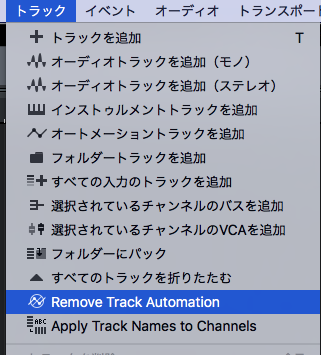
• New Track command: “Apply Track Names to Channels”
• “Cursor follows Edit Position” now limited to manually selected events or
ranges
• Batch renaming events always adds leading zero
• Event Inspector: Multi-editing for Event Start and End
• Arranger Track: Move Arranger Section only [Cmd+Alt]
• "Bounce to new Track" now preserves output routing
• Complete Show/Hide for Automation
• Automation Lanes on Instrument Track
• Improved time-stretching accuracy. “Audio Bend” mode now obsolete.

• Mixer (Console)
• Mixer Undo
• Remote control of StudioLive Series III Fat Channel and mic pre-amps
• New command: “Remove Track Automation” removes all automation data
• Visual plug-in bypass state in console
• Instruments and Plug-ins
• Fat Channel XT
• Adjustable level range for Spectrum Meter (all modes)
• Updated micro-views for Spectrum Meter
• 12th octave mode in Spectrum Meter (incl. keyboard scale)
• Loudness Meter now EBU R-128 compliant
• [macOS] MIDI input for AU plug-ins
• Event FX window follows Event selection
• [macOS] Preset list support for AU instruments/plug-ins
• FX Routing: Splitter can now be moved freely
• Music Editor
• Unlimited number of controller lanes
• Option to “Resize adjacent Events” (multiple overlapping) [Alt]
• Score Editing with Notion
• Send audio or note data to existing song
• Tempo map import (drag & drop)
• Other improvements within Notion (ReWire handling, Studio One application
launcher, and more)
• Project Page
• Independent Track Markers
• Flexible Loudness Detection options
• New Loudness Meter
• New Spectrum Meter
• DDP import
• Improved meta-data editing
• Pool in Project Page

• New Bounce Track option
• Dynamic search for Songs in Project (improved compatibility)
• Faster rendering (if a Song is used multiple times)
• New command “Bounce Track” (includes Track inserts, not Master FX)
• Extended “Add to Project” menu
• Improved ID-tag export (adding Composer and ISRC)
• User interface improvements
• New “Split Track” and “Split at Cursor” commands + shortcuts
• Browser
• New “Construction Kits” node in Loop Browser
• Search fields in Browser and Mixer reset on close
• Hardware and Multitouch
• Dual-screen support (Raven MTi)
• Higher MIDI update rate for control surfaces
• General
• Delete unsaved files and folders when closing new song w/o saving
• Warnings shown when errors occur while exporting mix in real-time
• Updated FLAC codec (better performance)
• Improved save and auto-save performance for Songs and Projects
• [macOS] Independent recording and playback devices
• Extended Bounce and Export options
• Support for 176.4 kHz sample rate in audio export

• [Developers] Gain Reduction API for VST2


The following issues have been fixed:
• “Invert Selection” didn’t restrict range when Scratch Pads exist
• Arranger Track section copy doesn't work backwards on timeline
• Pre-recorded notes overlapping loop start are doubled after loop recording
• Fade handles are hard to reach when event volume is not at max.
• Overlapping audio events with fade-in are out of sync
• Crash when recording MIDI in loop
• Play Start Marker affects bounce between markers

• No “Paste” in context menu for Tempo Track
• [ARA] Events show wrong content when split after analysis with Melodyne 4.1
• Crash with NI Komplete Audio 6 when changing sample rate
• Audio time-stretch with bend markers is not exact
• Chorder: Crash when transposing out of range with automation
• Install from "Cloud" inside Studio One 3.3 hangs
• Plug-in menu search box loses focus
• Command for "Show in Finder/Explorer" not working for Macros
• Can’t drag more than one Instrument from Browser
• [macOS] Newly created folders not visible in Browser
• “Copy external files” not working for multiple opened songs
• [macOS] Studio One language changes after re-install
• Crash while closing all songs
• Musicloop exports without audio when routed to outputs other than Main
• Wrong-placed note events in loop recording
• Sustain pedal with latency writes wrong data
• Global plug-in bypass not functional if any plug-in in Chain is disabled
• Spectrum Meter curve has offset depending on FFT size
• Channel buttons missing on Multi-Instrument channels
• [macOS] AU Instruments saved in OFF status load back empty
• [macOS] Kontakt AU not showing all available outputs
• Global deactivate FX not working with disabled tracks
• Inconsistent behavior when chasing long notes
• [Impact] Wrong channel order when moving sub outs in mixer
• Wrong channel order after transform to audio and back
• Wrong channel order between folders and busses
• Wrong channel order when dragging instrument to track
• Studio One will not export note data to Notion if the file has an apostrophe in the
name
• [macOS] Crash on start with OSX 10.11 El Capitan
• [macOS] AU presets always marked as edited
• |macOS] Invisible scroll bars in help window
• Offset when dragging audio file with bend-markers to Instrument Track
• Notes are transposed one octave when dragging to new Instrument Track via

Melodyne

項目多いです。

2017年3月20日月曜日

Studio One 3の使い方|TIPS:Pro EQを小さく表示する。スタジオワンの操作

軽い投稿を。

Pro EQは表示も大きくて見やすく作業しやすいですが、その大きさゆえ高画素密度ではないノートPCなどでは画面いっぱいになってしまうことも...。

そんな時には、上下を分ける境界線上の△をクリックするだけで、下部の操作系パネルを非表示にすることができます。


大き目の画面のProEQ


↓ コンパクトに表示できます。


Studio Oneガイドブック275ページ「Studio Oneのエフェクト」では、付属エフェクトを機能別にザックリと紹介しています。
エフェクト1つ1つを個別に紹介したい気持ちもありましたが、ページ数が必要な割にマニュアル以上の紹介をするのが難しい項目でもあります。冗長となるのも避けたいですし。

マニュアルはF1で開くので、目次>内蔵エフェクト>ミキシング のPro EQの項目を見てください。全てのノブの説明がしっかりとされています。なんせマニュアルは全ての機能が載っていますからね。

ちなみ今回紹介した機能もマニュアルでは以下のようにちゃんと解説されています。
「EQコントロールを表示/隠す スペクトラムディスプレイとEQコントロールの間の境界上の矢印をクリックして、EQコントロールの表示と非表示を切り替えます。」
さて、話はそれますがリファレンスマニュアルは「膨大な全機能(仕様や操作)を説明する文書」であるという役割ゆえ、「具体的な手順」「わかりやすい文脈」には重きを置かれない場合もあるでしょう。元が英文であるからは、丁寧に翻訳されていても(文脈や論法、文化の違いなどから)日本人には少々読み進めにくいこともあると思います。
その辺りを解決するのもガイドブックの役割ですので、マニュアルをお読みになられた上で「各機能の関連性や作業の流れを知りたいー」「わかりやすく概要を知りたいー」となったらStudio Oneガイドブックの出番です。

ということで、Studio Oneガイドブックは、マニュアルを読まなくてもStudio Oneを一通り体験できるように執筆していますが、マニュアルも読みつつご活用いただくことで相乗効果も期待できるでしょう。