ラベル ガイドブック の投稿を表示しています。 すべての投稿を表示

2023年12月23日土曜日

Studio One 6 ガイドブックのご感想をお寄せください

Studio One 6 ガイドブックをご購入いただきありがとうございます!!!

ご感想をお寄せいただきたくフォームをご用意いたしました。

ヘッドホンで音楽を聞く人のイラスト(男性)

実は、「わからない用語だらけだった」といった感想があることは知っているのですが、かといってすべての用語の説明をしていると読みにくくなるし、というところから、「どの用語について解説の需要があるのか」を教えていただきたいという思いからの投稿フォームでもあります。

読んだよ!など簡単なコメントも大歓迎です。

※大変恐れ入りますが、質問などをご記入いただいてもお返事をさせていただくものではございません事を何卒ご了承ください。(ブログの解説ネタに取りあげるかもしれませんが、直接的な回答は控えさせていただきますので何卒ご了承ください)。

※落丁などに関しては、お手数ですが出版社の株式会社スタイルノートまでお問い合わせをお願いいたします。

※Studio Oneについては、日本語版の場合は、日本代理店へお問い合わせください。海外購入の場合は、PreSonus社まで直接お問い合わせください。

ご覧頂いたことに感謝いたします!


2023年12月9日土曜日

Studio One 6 ガイドブックは12月27日発売です


ちょっと時間がかかってしまいましたが、『Studio One 6ガイドブック』(スタイルノート刊)を完成させることができました。

 前著『Studio One 4ガイドブック』から、バージョン5とバージョン6で追加された膨大な新機能や進化に圧倒されながらも、新機能による操作体系の変化を取り入れたり、まったく新しい機能の理解が深まるよう執筆しました。
 バージョン5から出版をお待ちいただいていた読者の方には大変にお待たせをいたしました。

今回は、初めて使う人が、このとおり設定すればできる!このとおりに設定したらボーカルトラック作れた!など、より実践的で最近のDTM界隈で必要とされていそうな「操作について」ガイドしました。例えば、ミックス師のかたがボーカリストに「ここ読んでやってみて」と言ってもらえるような内容を目指している記事もあります。

今回も分厚く500ページ近くありますが、おなじみのかえるの合唱のメロディーでのチュートリアルのほか、v5とv6,そして最新v6.5の機能も紹介しています。

操作系や画面構成、使いこなしなどの記事は、これまでの有用な記事を残しつつ、ブラッシュアップしています!自分で使う操作やショートカットもたくさんですので実践的かと思っています。

Dolby Atmosミックスについても、取材したり助言を求めたりしながらしっかりと掲載しました。ぜんぜんわからないという人もまずはとっかかりにしていただけるかと思います。

v4の掲載記事をなくなくカットして、その分たっぷり新たな記事を登場させている部分もあります、どうぞご覧ください!

アマゾンでは先行して予約開始しておりご予約頂けます。
どうぞよろしくお願いいたします!


2019年11月13日水曜日

e-Instruments社のPresence XT用ベース音源について|Studio Oneの使い方

期間限定で、e-Instruments社のPresence XT用ベース音源「eBass」が現在無償DLできるようですので試してみました。

(ダウンロード方法ほか詳細は、すっかりStudio One定番サイトのうんこバンドさんのページがとても参考になります。拙著Studio Oneガイドブックも紹介していただいてます。感謝。)

Presence XT用なので、1)ドロップすれば音源と一緒にエフェクト設定も読み込まれたり、2)そのエフェクトがマクロコントロールで一体化していて一元管理できたり、3)音色の特徴を活かしたループ(musicloop)が用意されいたり、と使いごたえのある音源パックとなっています。


1)ブラウザから音色をドロップすると、音源(Presence XT)が立ち上がり、デバイスラックにエフェクトが読み込まれる。


2)チャンネルエディターからのマクロコントロール


3)musicloopが用意されているのも嬉しい。ブラウザのループタブで、「並び替え:」を「製品」にして「eBass Classic Finger」など製品名のフォルダーの中を見ると見つけやすいです。ベンダーで「E-Instruments」を探すのもありです。

あ、もっと基本ですが、音色を使うには、4)ブラウザのインストゥルメントタブを表示して、Presence XT内のeBassフォルダ内の音色をアレンジウィンドウにドロップします。「並び替え」をベンダーにしておくと、eBassというフォルダ内に音色があります。


4)音色をつかうにはブラウザからアレンジウィンドウにドロップ

なお、音色名の後ろにPerformanceと付いているのは、リアルタイムで演奏するための機能が設定されており、Productionと付いているのはキースイッチなどでフル機能を扱えるのでしっかりと打ち込むのによいでしょう。FXとついている方は、コンソールにエフェクト(FXチェーン)も一緒に読み込んでくれます。


5)リアルタイム演奏するならPerformance、打ち込みでフル機能にアクセスするならProduction、FXはエフェクト付き

キースイッチの割り当てや特殊な機能については、マニュアルにすべて書いてあるので、音源をダウンロードするときにマニュアルも一緒にダウンロードするとよいでしょう。
もしくはPresencen XTの操作パネルに記載があります6)。


6)使い方が記載されている。使い倒すならマニュアルが参考になります

Presence XT純正の音色のようにキースイッチが鍵盤やピアノロールに表示されないのは残念なところです。(無理やりやるなら自分でnotenameを編集する、、、、とかでしょうか)


7)上図は、Presence XT付属のギター音色「Les Paul Full」。キースイッチで奏法を切り替えられ、該当する鍵盤が赤く示され、ピアノロールのノートには奏法名や効果名が表示されるので便利。
eBassも表示されればいいのですが、とりあえず初期状態では表示されず。

と、色々な機能が活用されているので、ダウンロードだけしたけど使ってない〜。という方も一度触ってみてはどうでしょうか。

肝心な音については、e-Instruments社のSound Cloudをご覧ください。


なお、Studio One ガイドブックでは、418ページ「コントローラーの集合体「マクロコントロール」や、210ページ「音楽素材(ループ)」などで関連する操作を紹介しています。予備知識としてあわせてご参照ください。
ガイドブックについてはnote記事でも紹介しています。


2019年8月27日火曜日

Studio One 4 ガイドブック|新刊情報

拙著、ようやく発売日が決まり、販売ページや紹介ページをご用意いただけましたのでお知らせいたします。

以下はアマゾンの商品ページです。
ご予約いただけますので、何卒よろしくお願いいたします。


近藤 隆史(著)
 「Studio One 4ガイドブック|進化するDAWソフトでイチから音楽づくり」
書店発売予定日 2019年09月18日

また、以下は出版元のスタイルノートさんでの紹介ページです。
リンク先にて目次や前書きなどをご覧いただけます。

 「Studio One 4ガイドブック   
進化するDAWソフトでイチから音楽づくり」

前書きを紹介していただいておりますが、以下がポイントかと思っています。
最近のStudio Oneは、作曲家・アレンジャー向けの機能追加が充実しているようです。そこで、今回は「機能体験ツアー編」をあらたに追加しました。読み進めると、Studio Oneの操作や機能を体験しながら、ちょっとしたアレンジの楽曲を作り上げられるようになっています。
前回v3版の352ページから、v4版では496ページとなりました。
かなり分厚くなっておりますので、ぜひ実際にお手に取っていただけますと幸いです。


2019年5月22日水曜日

Studio One 4.5リリース|スタジオワンの更新情報、新機能

取り急ぎ
2019.5.21に、Studio One Version 4.5.0がリリースされました。
MI7でオフィシャルな新機能紹介が公開されています。※注意!音出るかもです。


オフィシャルページは全部読むの大変ですので、ささっとチェックしたい方は、以下をご参照ください。
だいぶ言葉足らずですが、丸のついているあたりをご覧いただければこのへんが変わったのか、というチェックはしていただけるかと思います。
※新機能の網羅はしていません。

=====
さて、盛大に遅筆な結果、バージョン4.5についても記載することができそうです。

Studio One 4.5の新機能については、「Studio Oneガイドブック バージョン4対応」で紹介する予定ですが、スクリーンショットだけでもご参考までに。

入力チャンネルにゲインと位相調整、すべてのチャンネルにも

グループ化の再設計


ピークメーターのみ表示、プリフェーダーで表示


I/O設定の利便性や設定保存


シンプルなサイドチェーン設定


プラグイン選択方法(表示形式)の追加


モノラルミックスダウン


アクションメニュー追加、マクロ化も可能


スケールにトライアド追加


コードの試聴が充実


ゼロクロスポイントにスナップ


イベントのロック、トラックのロック


プリセット保存時にフォルダー選択が可能


より多くのマーカーにアクセス


1アクションでオーディオループに


プラグインマネージャー搭載


スムーズな波形描画


ビデオ書きだしに対応


AACの書き出し/読み込みが可能に


負荷が軽く...などなど


ガイドブックでは丁寧に解説する予定ですので、ぜひご覧ください。
ということで、執筆中です。今回は、発売と同時にバージョンアップが!!とはならずにすみそうです。が、ところどころ画像差し替えや修正が必要です。


Version 4.5.0 Release Notes (May 21, 2019):
Studio One 4.5 adds the following new features and improvements.
Recording and Mixing
● Redesigned hardware controls (gain/polarity/48V) on mixer channels (for compatible
PreSonus interfaces)
● Input Mixer: software gain / polarity controls on every input
● Software input gain / polarity controls on every channel, bus and FX channel
● Extended grouping system with attributes (Volume, Pan, Mute/Solo, Inserts/Sends)
● Groups definable as Edit- and/or Mix-Groups (with attributes)
● Commands/shortcuts to suspend any group
● Command to suspend all groups
● Support for unlimited nested groups (groups within groups)
● New Groups section in Track List and Channel List
● Optional group name display on channels with Group assign and renaming options
● Customizable Channel Components in Console
● RMS/Peak metering option per channel
● Global Pre-Fader Metering option
● Quick-assign I/O routing for multiple selected channels
● Quick-assign outputs in ascending order
● Basic and Advanced Plug-in menu styles
● Alternative (reverse) Sidechain routing
● Copy Plug-ins with Sidechain routing
Arrangement and Editing
● Lock Events (with position and editing options)
● Lock Tracks option
● Independent Quantize/Timebase/Snap options
● Snap to Zero Crossings
Musical (MIDI) Editing
● Chord Audition option in Chord Selector
● Chord Audition option for chord events in Chord Track
● User assignable Chord Audition sound
● New Major/Minor Triad scales
● Re-organized Musical Actions menu
● Stretch multiple notes by dragging
● Note Action: Apply Scale
● Note Action: Distribute Notes
● Note Action: Randomize Notes
● Note Action: Quantize Notes
● Note Action: Mirror Notes
● Note Action: Repeat Notes to Part End
● Note Action: Thin out Notes
● Note Action: Fill with Notes
Workflow
● Independent Macro Toolbars for Arrangement, Music Editor and Audio Editor
● Macro Toolbar: custom menus
● Macro Toolbar: direct macro editing
● Macro Toolbar: Duplicate Macro command
● Macro Toolbar: “move to Group” command
● Impact XT: drag more than 16 samples or slices
● Patterns: support for Quintuplets / Septuplets resolution
● Improved swing timing for patterns with individual lanes resolution
● Stem Export: quick drag>select tracks/channels
● Stem Export: save selection when closing window
● Song Data Import retains “Disabled” track state when importing
● Fat Channel XT modules retain state when switching
● Instrument list: “disable all” option
● Instrument list: “remove unused” option
● Store Presets with folder selection
● Assignable F13-F24 keys
● Recall any Marker with shortcut
● One-step Audioloop export (drag&drop)
User Interface
● Smooth audio waveforms (option)
● Macro Toolbar icons update
● Sample One XT / Impact XT: improved unit readouts
Performance
● Improved CPU performance with Multi Instruments
● Improved CPU performance with Mai Tai, Sample One XT, Impact XT and Presence XT
Hardware and Installation
● I/O Setup: add multiple inputs or outputs
● I/O Setup: re-order inputs / outputs with drag & drop
● New Plug-in Manager with filters by format and vendor
● Plug-in Manager: list and reset blacklisted plug-ins individually
Import / Export
● Import / Export I/O Setups
● Video Export option with multiple codec support (platform-dependent)
● MP3 Export with variable bitrate
● AAC support (Import / Export), including ALAC (Apple Lossless)
● Mono option for Export Mixdown
Other
● [VST3] Support for program pitch names and key switch API
● [VST2] Host-specific extension to query key switches from plug-ins

The following issues have been fixed:
● Text field may lose focus when search result is displayed
● Artifacts with volume automation
● Very short MP3 files cannot be imported
● Macro toolbar presets get lost if multiple songs are closed in a certain order
● Bounce in place inserts silence when there's an Open Air instance as EventFX
● VCA automation offset incorrect
● Click coordinate of pen is slightly off
● Potential lockup when using "Follow Chord"
● True Peak sometimes delivers wrong values
● [MacOS] Random order in file lists generated from APFS volume
● Mod wheel assigned to Sample One eco filter behaves unexpectedly
● NoteFX remain active after rendering with Chorder
● Track Transform does not retain VCA assignment
● Track/channel colors lost on transform multi-out instruments
● Some elements need more contrast in Light Theme
● Some time-stretched events in Scratch Pad play back incorrectly
● [Windows 7] Potential crash while applying Touch+Swipe on certain plug-ins

● Typos in AudioBox 1818VSL I/O labels


拙著のご紹介(旧バージョン版)

※バージョン4のガイドブックはまだ出版されておりませんのでお間違いなくお願いします。バージョン4対応版、、、いいかげんに完成させないとです。

2018年9月14日金曜日

Studio One 4.1リリース|スタジオワンの更新情報

取り急ぎ
2018.9.13に、Studio One Version 4.1がリリースされました。


少しだけ...。

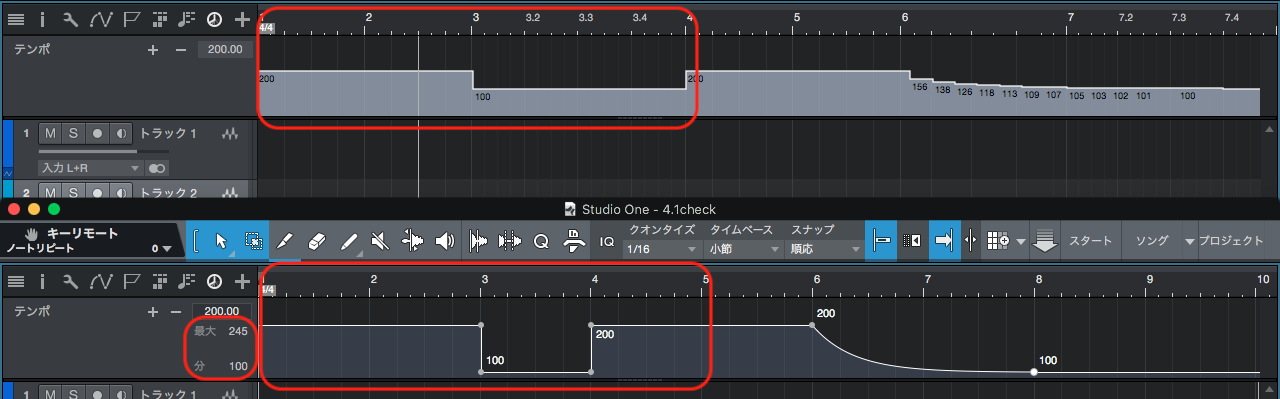
テンポトラックが機能アップ。
ジャンプではなく傾斜や曲線で表現できます(オートメーションカーブと同じ操作感で)。
テンポトラックの高さを無駄なく使えるように上限下限の数値を設定できます。なるほど。
タイムリニア/ビートリニアの違いは以下の図の3小節目を見比べるとわかります。(下のビートリニアでは、1小節の幅がテンポにかかわらず同じ幅で、カーソルの動く速度が変わる。今まではタイムリニアのみで、カーソルの速度は一定で小節幅が可変。)


PipelineXTになりました。Mono→Stereoが可能です。設定も自動化?がすすみやりやすいです。プリセット保存できるしカラーも変わるし、いいですね。
あ、Pipelineが読み込まれていても、使ってなければリアルタイムバウンスを強要されなくなったそうです。(未確認ですが)


ノートリピートはこないだまで取り上げにくい感じでしたが、ライブにも使えるいい感じにアップデート。
ATOMがリリースされたのも大きいのでしょうね。相性良さそうです。


キューミックスがコンソールのソロの影響を受けるかどうかを設定できるようになって、受けないのがデフォルトになりました。前の状態にしたいなら受けるように「従う」のチェック入れましょう。


ところで、v4で画面の小さいPCだとコンソールのcueMixの項目が隠れがちですよね?なくなってしまったのか?と探してしまいますが、同じ場所にあるので頑張って引っ張り出してみてください。Macだと「キューミッ..」が哀しいです。Windowsもスが欠けてます。半角カナ?


AAFも各DAWに対応すべくアップデートされてます。PTとかDPとかLogicとかとうまくいってなかったのへの対策ですね。プラスアルファ。

QWERTYキーボードの見た目が新しく、、、。


駆け足でしたが、、、ガイドブックではもう少し丁寧に説明しようと思います。


拙著のご紹介(旧バージョン版)

※バージョン4のガイドブックはまだ完成してませんのでお間違いなくお願いします。

でも、幸いなことに基本設計や見た目の激しい変化は少ないので、旧バージョン3のガイドブックでも、差分PDFと合わせれば、新機能以外はかなりの部分で共通の操作をご確認いただけるでしょう。

バージョン4対応版は新規に準備中です。


Version 4.1 Release Notes (September 13, 2018):

New features and Improvements:
• Support for PreSonus ATOM Production and Performance Pad Controller
• New Pipeline XT plug-in for routing of external effects
• Extended Note Repeat with keyboard remote
• Tempo Automation
• Beat-linear timeline option
• Improved manual tempo mapping with Scale Time tool
• Tap tempo via keyboard shortcut
• AAF export options (including embedded AAF support)
• Import Song Data from song template
• New “Cue mix mute follows channel” option
• New look for External Device panels and QWERTY Keyboard
• The macro bar now stores the last page viewed per editor
• Select Highest or Lowest notes more accurate when overlapped
• Key command mapping for "Song Setup" dialog
• Tempo map added to rendered click file
• Improved zoom and scroll behavior in Pattern Editor
• [Windows 10] System DPI scaling option for third-party plug-ins
• [Windows] “Enable High DPI Mode” option is back

The following issues have been fixed:
• [macOS Mojave] Scrambled icons in message boxes
• [macOS] Accessibility zoom breaks context menu
• [macOS] Deadlock on clicking main menu bar with system file selector open
• [Windows] Help Viewer doesn't adapt to different monitor DPI
• [Melodyne] Editor not immediately opening on edit
• [Chord Track] Wrong detection inside arpeggios
• [Chord Track] Accidentals not displayed correctly in the pop-up selector
• [Drum Editor] Unwanted double notes when duplicated
• [Drum Editor] Duplicating notes with swing are placed in wrong location
• [Track Inspector] Automation controls background missing
• [Track Inspector] Event FX container doesn't remember size
• [Track Inspector] Automation parameter select-box text is hidden by color field
• [Presence XT] Ping Pong looping issue with short samples
• [Presence XT Editor] Crash on copying zones
• [Impact XT] Amp envelope should be exponential
• [Impact XT] Missing "Cancel" button on initial sample search
• [Impact XT] Pad Names are overwritten while editing (user vs file name)
• Macro toolbar scripting error
• Pitch editing doesn't accept B from keyboard, changes it to A#
• Enabling Note Repeat aftertouch + playing aftertouch causing infinite note
• REX file import issue when song sample rate is different from file
• Playback of stretched audio sometimes incorrect
• Remotes do not generate undo steps for all parameter changes
• Wrong waveform drawing when creating loop range
• Potential crash when opening detached audio editor
• Channel macros lost connection to parameters on Import Song Data
• Steps placement is incorrect when duplicating a Pattern
• Plug-in thumbnail icon not inverted in light theme
• Applying Mute on mouse down causes audible clicks
• Crash on save after removing Multi Instrument
• GUI artifacts while scrolling w/ TAB thru track name fields
• Copying an event from a folder pastes it on a new track
• Song parameters are reset when Time Base is changed to Frames
• Wrong inverted note selection in a duplicated (shared) part
• Wrong automation result after moving arranger section
• "Move" and "Copy" w/ Ripple Edit on the same track deliver different results

2018年7月11日水曜日

Studio One 4.0.1リリース|スタジオワンの更新情報

取り急ぎ
2018.7.10に、Studio One Version 4.0.1がリリースされました。


調整的な新機能と修正たくさん。
そしてPrimeが公開されました。v4発表後、v3Primeは配布終了していたので、待ち望んでいた方もいらっしゃるのでは。

リップル編集がアレンジビュー、オーディオエディタどちらでもできるようになったり、コードトラックの初期色がグレーじゃなくなったり、と微調整やインターフェース改善的な新機能がちらほら。


「ImpactXTのPadに割り当たっているサンプルを、OS(ExplorerやFinder)で表示できるようにになった」


また、SampleOneが互換性を含め色々修正されていて、v3のソングを開いた際のフィルター値のFixとか含むので、SampleOneを使用したv3のSongを4.0.0で開いておかしかった場合は、あらためてv3のソングを4.0.1で開くと、なんか変わっているかもしれない、とか、色々あるかもしれませんがどうでしょう。

あ、v3とv4でサウンドエンジン(コード)の変更はないそうですよ。
バージョンをまたぐ場合は、外部プラグインも含めて互換性などさまざまな要素に注意しないと、なんか変わってしまうかも、とか気をつけないとですね。
(大切なソングは作り始めたバージョンで完結させるのがオススメです)
純正でも無印からXTへの変更は、名前は踏襲していても、v3のPresenceXTの時のようにプリセットサウンドやプラグインエンジンの変更があったり、今回のように、互換性でちょっとした修正が必要だったりして、変化がある場合もあるかもですね。(v3でのPresence、v4でのSampleOne、Impactしかり...です)
あ、v3.3以前からv4にジャンプアップしてる場合は、v3.5でのドロップアウト保護の機能追加に要注意です。設定によってはレイテンシーの大きいプラグインなどがバイパスされるので、出る音が変わります(プラグイン無効なので当然ですが)。


個人的には、ドラムエディタで「D」押しても正しくコピーされないのが修正されてよかったです。エディターでダブルクリック&ホールド&XY軸でベロシティやレングス調整できないのも修正。
ImpactXTの出力がおかしくなるのも修正されたそうです。
そのほかたくさんです。

あ、FaderPortのノーマルが刷新されましたね。これのドライバもついでにインクルードですかね。ほしいです。


拙著のご紹介(旧バージョン版)

※バージョン4のガイドブックはまだ完成してませんのでお間違いなくお願いします。

でも、幸いなことに基本設計や見た目の激しい変化は少ないので、旧バージョン3のガイドブックでも、差分PDFと合わせれば、新機能以外はかなりの部分で共通の操作をご確認いただけるでしょう。
v3.5差分マニュアルでは、ドロップアウト保護の解説もしています。

バージョン4対応版は新規に準備中です。


Version 4.0.1 Release Notes (July 10, 2018):

New features and Improvements:
• Studio One 4 Prime available
• [Impact XT] Keep MIDI note assignment when using "Clear Pad" or "Clear Bank”
• [Impact XT] "Show in Finder/Explorer" option in pad context menu
• [Sample One XT] Improved backwards compatibility
• [Pattern Editor] Improved Variation selection (clickable area)
• [Pattern Editor] Added tool tips for columns
• [Drum Editor] Note color by pitch reflects pad colors when Impact XT is used
• Improved editors scrolling, zoom and focus behavior
• Ripple Edit now also working in Audio Editor
• Default color for chords
• Light Theme adjustments
• The editors have a minimum size now
• Various user interface design corrections
• Various localization fixes

The following issues have been fixed:
• [Arranger] Song Offset Causes Time Ruler Numbers to Disappear on Zoom
• [Arranger] Transform does not work for Pattern
• [Arranger] Crash in track navigation with shift+arrow key
• [Arranger] Crash on creating an audio track when no input device is selected
• [Arranger] Unable to use up/down arrows to scroll tracks w/ collapsed folders
• [Arranger] Can't drag .musicloop with pattern to audio track
• [Arranger Track] „Don't follow Track“ setting causes errors
• [Arranger Track] Events don't follow correctly on tracks with different time formats
• [Chord Track] Auto-scroll not working when Chord Track is last or only header track
• [Chord Track] Duplicating chord blocks doesn't retain original color
• [Chord Track] Follow Mode not visible in minimum screen resolution
• [Chord Track] Inconsistent behavior when editing chords (Resize adjacent)
• [Drum Editor] "Duplicate" inserts notes at wrong position
• [Impact XT + Sample One XT] Automation orphaned from v3 to v4
• [Impact XT] Follow Tempo produces clicks
• [Impact XT] V3 mono outs 1-8 change to stereo out 9-16 in V4
• [Low Latency Monitoring] Bounce renders empty if Monitor on w/ Ampire
• [Macros] Moving groups sometimes deletes the selected page
• [Macros] Note Length not applied correctly to last chord in a part
• [Macros] Note selection not accurate
• [Melodyne] Detached window opens in wrong size, and sometimes freezes
• [Mixer] Input insert bin - only half of the vertical space is used
• [Mixer] VCA channel is muted after reload song
• [Music Editor] No consecutive X:Y drag actions possible after note insert with arrow tool (double click+hold)
• [Music Editor] No NoteOff generated on first loop cycle for overlapping notes
• [Pattern Editor] Automation Lane Changes on Loop
• [Pattern Editor] Drum Mode automation lane not changing to related pitch on touch input
• [Pattern Editor] VST2 Automation in Pattern shows current value for every note
• [Preferences] "Copy external files when saving song" option ignored on samples dropped on Impact XT & Sample One XT
• [Presence XT] Editor icon picker has no contrast
• [Sample One XT] Free LFO works the other way around
• [Sample One XT] Freezes on exchanging 96K samples while song is playing
• [Sample One XT] issues with S1 v3 presets
• [Sample One XT] Pitch not responding on LFO, Env or pitch-bend when "Follow Song Tempo" is enabled
• [Sample One XT] Wrong Filter parameter states when loading v3 song
• [Scratch Pad] Bar offset is ignored
• [Scratch Pad] Wrong part size when using negative numerical start value
• [Scratch Pad] Possible to extend Part start beyond Scratch Pad causing unexpected length of the Part
• [Scratch Pad] Offset event w/ Melodyne edits not copying to new Scratch Pad
• [Slate Raven] Applying touch automation selects the track instead of writing automation
• [Slate Raven] Crash when removing inserts from the channel editor
• [Slate Raven] Display ID Index Shift
• AAF Audio on single track with automation not imported
• AAF import of certain Samplitude files not working
• Beat offset and Start/End Markers in Song Templates
• Bounces are cut by latency reported by plug-in
• Certain legacy songs won't save
• Context menu latches focus item on mouse down
• Crash on switching presets inside u-he Diva AU
• Crash when switching patterns with different control lane parameters
• Cue Mix section of FX channels cropped
• Duplicate complete omits an automation envelope
• Event Inspector cannot have arbitrary size anymore
• Extension dialog uses multiple font baselines
• Inverted color of fader bar-graph
• Multi instrument size issue
• Qwerty keyboard issue with Record Offset
• Scroll handle disappearing on lists with horizontal and vertical scrollbar
• Shift Root (Alt + Scroll) causes focus on Menu
• Time signature markers can't be deleted
• Transport bar elements hidden (language dependent)
• VST support plugin not connected to Artist flavor
• XML import doesn't work with Cubase 8 demo song

2018年6月16日土曜日

Studio Oneの買い方|お得なクーポン情報(期限終了)

今日は怪しげなタイトルでのエントリーです。

(この記事のクーポンは、すでに使用期限が終了しました。)


Studio One バージョン4 がリリースされしばらく経ちましたが、もうお使いでしょうか?
バージョンアップする場合は、ぜひ拙著「『Studio One 3ガイドブック』バージョンアップ差分PDF(バージョン3.5差分)」(スタイルノート刊)をチェックしてください。
お得なクーポンがエムアイセブンジャパンさんから提供されております!(期限2018.6.30


v4へのバージョンアップ時にも使用でき、とてもお得です。NotionもQuantumにも使えます。Studio Oneアドオン各種にも使えます。キャンペーンからさらにお得だったりします。「Tape」は、現在Softubeがキャンペーンをやっていて、そこからさらにクーポン使用だったりでお得です。

ほんとうにお得です。

※最後3ページ前のPreSonus Quantum広告の下をご覧ください。まずは通常価格や現在のキャンペーン価格で表示されますが、購入手続きの途中でクーポン入力欄があるとのことです。
※キャンペーン内容やクーポン適用に関して、もし異なるようでしたらMI7STOREに直接ご確認ください。そちらが正しい情報になります。(私は実際に購入しての確認まではできておりませんため、すみませんがご注意ください。)※クーポンの有効期限は2018.6.30までです。
いつもご協力いただいているエムアイセブンジャパンさんに感謝の意を。

Studio Oneガイドブック 差分PDFは、どなたにもご覧いただけます。
差分PDFは、書籍版「Studio Oneガイドブック」の雰囲気をご確認いただく目的もあり、普段であれば、「書籍もお手に取ってみてください。」とお願いするのですが、現在は新規にバージョン4対応版を準備中です。
旧バージョン版をおすすめするのも気が引けますので、気長にお待ちいただければ幸いです。

それでも一応ご紹介(旧バージョン版)

※バージョン4のガイドブックはまだ完成してませんのでお間違いなくお願いします。

でも、幸いなことに基本設計や見た目の激しい変化は少ないので、旧バージョン3のガイドブックでも、差分PDFと合わせれば、新機能以外はかなりの部分で共通の操作をご確認いただけるでしょう。

バージョン4対応版は新規に準備中です。

2018年5月23日水曜日

Studio One 4.0.0リリース|スタジオワンの更新情報


バージョン4がでました!

すぐにガイドブックの執筆に入ろうと思います。

Studio Oneガイドブックは、チュートリアルで1曲作る中で、なるべく多くの機能に触れて、DAWでの楽曲制作の流れや考え方を体験してもらう構成になっています。
そのため、新機能だけを追加して改定して出版!とはなりません。(それならラクなのですが)

新機能を含めたチュートリアル的な何か、楽しく作業できる内容にできたらいいなぁと思ってますが、はたしてどうなるか。
いつもいってますが、筆は遅い方です。。。。。

マニュアル的な内容ならブログで紹介しても、ガイドブックの内容とは被らないので、新情報などあれば更新したいところです。

現時点では何より公式なエムアイセブンジャパンのHPがためになります。


ここではざっと新機能の所感など。なんと今時ノーピクチャー、ノームービーでのエントリーです。
(こういうのは駄文長文でもいいかなと思ったり)(機能などまだ未確認なので内容変更あるかもしれません。ご了承の上お気をつけください)

コードトラックなどコード関連の新機能は派手な進化ですね。オーディオもMIDIも追従しているようで。すごいです。
コードの検出が目当てなところもあるようで、他のDAWとは考え方が少し違うところもありそうなので、ガイドブックでしっかり取り上げたいと思っています。

オフセットが設定できるようになってます。-2小節目からスタートしてデータいれるのは1小節目から、とかやっとできるようになりました。ビデオのオフセットもマイナスでできるようです(フレームレートでも)。

ソングにキー設定できるようになりましたが、曲頭のみ?途中の変更はどうするのか、などなどちょっと要チェックです。(できないかも)
これでNotionに転送時のキー管理の問題が解決できているとよいですが、、、どうでしょう?
これまでStudioOneでシャープ系の調のつもりで制作してNotionに転送したら、#、b、入り混じって臨時記号で処理されたりして、なかなかの暴れっぷりでしたが、S1に調号情報が持てたことで改善するのか?要チェックです。
今度のガイドブックではNotionとの連携も、もう少し解説したいところです。
あ、コードトラックの情報が、Notionの楽譜上にコードネームとして記載されるのは、リードシート作成に便利ですね。

リップル編集は動画編集とか、音声編集的な作業においては、かなり効率化でしょう。
ネットラジオで録音回しっぱなしにして、編集点で切っていったら、どんどん切り詰めてくれるので、これまでのようにグリッドをイベントにして、キッチリ詰めて、、、とか必要なくなりました。
同様にギャップを削除してくれるのも、イベント間を一発で詰めてくれるので編集ではそうとう効率化でしょう。これも便利。


ImpactXTは色が変えられるようになる、という見た目の激しい進化がありました。16PADを8バンク切り替えられるという、音色扱いの進化のほか、機能もだいぶ増えているので、ガイドブックでも進化っぷりをどこかで取り上げたいところです。
なお、アウトプットが16Stereo,16mono32Outputと、すごく増えてます。前は8?。
これ「オリジナルのImpactとの下位互換も完璧」とはありますが、Impactのマルチアウトをやっているソングの場合は一応要注意ですね。
(追記:v4.0.1でもろもろの互換性が修正されました

SampleOneXTも進化が激しいですね!プラグイン内で録音して波形編集してサウンド作りまでできるという完結型で、付属インストゥルメントでここまでできるのはすごいです。ガイドブックでしっかり取り上げようと思います。
つられて?PresenceXTも(Editor版では)リバースできるよになるなど、見た目はもっとも変化が小さいですが進化してます。

MusicEditorの変更は何と言っても、ドラムエディターやパターンの搭載ですね。これもしっかりとガイドブックで解説したいところです。

AAF Import / Exportは、OMFの要望を飛び越えてきた感じですね。
 (supports Pro Tools, Logic, Nuendo, Final Cut Pro, Premiere and others)だそうです。
完全互換か、気をつける点があるかなどはこれから要チェックです。
このあたりのファイル互換で、StudioOneのソングをソングに読み込むということも実現したようです。これで、ブラウザからちまちまとトラック情報を読み込む工夫は不要になりました。

トラックやチャンネルにもノートパッドが搭載されて便利です。

コンテンツはv3と同じものにくわえて”Impact XT Kits and Sounds” (1.8 GB)が加わりました。あとデモソングも新しくなってます。デモは新機能を探るのにもよいですね。

MP3がフリーになって、全バージョンにMP3エンコーダーが搭載されました。PrimeでもMP3を扱えるのはよいですね。

忘れていたので追記。v4から64ビットアプリのみです。32ビット版はなくなりましたので、32ビットのVSTプラグインは対応しません。注意が必要ですね!

そして、Notionも6.4にバージョンアップしてます。
http://blog.presonus.com/index.php/2018/05/22/notion-6-4s-new-features/

Studio Oneからのコードトラック情報や調号の受信、マーカーをリハーサルマークとして読み込み、などですね。Notionは浄書というよりリードシート作成などを目指している感があるので、こういった機能は順当進化でしょう。
転送時に日本語ファイル名だと動作しない不具合も解決したようです(そもそも国外開発のプログラムでは半角英数のファイル名がおすすめだと常々思っています)。
あと、三連符の設定の時の画面の日本語翻訳が改善してますね。これ、読んだだけでは絶対正しく設定できなそうな訳だったのでよかったですね。
(三連符を、何拍の中に音符をいくつ配置するか、という日本語化しにくい項目)


なんにせよ書きます。


Version 4.0.0 Release Notes (May 22, 2018):

This initial Studio One 4 release adds the following new features and improvements.

Arrangement / Editing
• Chord Track
• Realtime chord re-harmonization of Audio and Instrument Tracks
• Intuitive Chord Selector
• Automatic chord detection
• Realtime chord input from MIDI device
• Song Key Signature with detection
• Chord Transpose
• ARA 2 support
• Expanded “Send to Notion” option for lead sheet creation
• Ripple edit mode
• Relative bar offset for songs
• “Remove gaps” for Events

Virtual Instruments – Impact XT
• new look and feel
• 8 pad banks
• 32 outputs (16 stereo, 16 mono)
• color option for pads
• new 24dB zero-delay feedback filter
• filter drive and punch controls
• filter "soft" (clipping) mode
• pad and individual sample editing
• new stack mode for layering samples on a pad
• realtime time-stretching (follow song tempo)
• trigger quantization
• sample choke with 32 choke groups
• reverse sample playback
• sample level normalization
• increased pitch envelope range (+/- 48 semitones or 8 octaves)
• improved sample navigation
• “Pad Follow” mode for remote navigation
• drag & drop pad swapping
• drag & drop multiple samples at once
• optional auto-slicing on sample import (shift)
• “Send to new Impact” shortcut in audio context menu
• drag & drop sample import from Sample One XT and Presence XT
• import and export of multisample files and ".soundx" containers
• eight user-selectable color themes

Virtual Instruments – Sample One XT
• new look and feel
• record page with live sampling
• samples from any hardware input, send, output, other instrument
• auto-slicing mode creates new samples automatically with adjustable gate
• global and individual (sample) edit modes
• fx section: modulation, delay, reverb, gater, eq, distortion, pan
• expandable keyboard
• realtime time-stretching (follow song tempo)
• sample snap to zero crossing
• sample crossfade
• waveform slicing option
• sample trim option
• sample sustain, release and ping-pong loop modes
• graphical envelopes with adjustable attack, decay, release curve shapes
• increased pitch envelope range (+/- 48 semitones or 8 octaves)
• alternative trigger modes: normal, one-shot, toggle
• visual play cursor in waveform view
• sample reverse playback
• sample level normalization
• new 24dB zero-delay feedback filter
• filter drive and punch controls
• filter "soft" (clipping) mode
• LFO random (sample+hold) mode
• master volume control
• adjustable voice limit
• import and export of multisample files and ".soundx" containers
• drag & drop export to Impact XT
• eight user-selectable color themes

Virtual Instruments – Presence XT Editor
• sample snap to zero crossing
• reverse playback option
• 1,000 choke groups
• ping-pong loop mode
• play-cursor in waveform display 

Music Editor
• Drum Editor
• Drum and Melodic Patterns and Variations
• Patterns saved in Musicloop
• Automatic mapping (Impact XT)
• Alternate note coloring schemes
• Sync option for editors
• “Select notes...” options
• New or improved note event options (Humanize, Length, Velocity, Delete Notes)
• Multiple Macro toolbars (page selection)
• Improved multi-editing
• Preserve and restore zoom states

Import / Export
• AAF Import / Export (supports Pro Tools, Logic, Nuendo, Final Cut Pro, Premiere and others)
• Import Song Data

User Interface
• Alternative “light” color scheme
• Additional appearance presets
• Updated mix console design
• Track / Channel Notepads

Content
• New Sound Set “Impact XT Kits and Sounds” (1.8 GB)
• New Demos and Tutorials (1.6 GB)

Other
• External Plug-in scanner (VST2, VST3)
• MP3 Encoding in all versions

2018年1月24日水曜日

Studio One 3の使い方|TIPS:イベントコピー時にレイヤーがついてくる?

簡単なtipsを。

イベントを他の場所でも使いたくてコピーするには、範囲選択してAlt+ドラッグします。

その際、属するレイヤーも引き連れていくかを「レイヤーはイベントに従う」で決められます。

以下、画像と共に解説。

1)選択範囲を他でも使いたい!


2a)レイヤーを引き連れてコピーしたければ「レイヤーはイベントに従う」にチェックを入れる。


コピー先にはレイヤーもコピーされる。コピー先であらためてコンピングも可能なのが便利ポイント。


2b)イベントだけをコピーしたければ「レイヤーはイベントに従う」チェックを外す。


コピー先にはイベントのみコピーされる。コピー先にすでにレイヤーがある場合は、それらのレイヤーが消えてしまったり、混ざってぐちゃぐちゃになるのも避けられる。

例えば、1番の一部分だけを2番で使いたい場合に、レイヤーも引き連れてコピーすると、2番用に録音したレイヤーが上書きされたりなど何かと大変です。
デフォルトではチェックが入っていますが、シチュエーションによりオン・オフを切り替えるのがおすすめです。
そのほかにも役立つシチュエーションがあると思います。

レイヤーが付いてきてしまって困っている方のご参考になれば...と。

Studio Oneガイドブックでは、チュートリアル的に楽曲制作の流れを体験できるようにもなっているので、使用方法だけでなく大きな流れも意識しながらお読みいただくと、より効果的にStudio Oneを習得できます。

2017年11月30日木曜日

Studio One 3.5.3リリース|スタジオワンの更新情報

取り急ぎ
2017.11.28に、Studio One Version 3.5.3がリリースされました。

プロジェクトでトラックとイベントの分割を同時になったのは順当進化ですね。プロジェクトのCD書き込みでお尻が数秒なくなるの改善!。3.5でのマイナー改善がだいぶできた感じでしょうか。


「一緒にやれるようになりました」


PreSonus has released Studio One v 3.5.3 with the following improvements;

New features and improvements in Studio One 3.5.3
• Support for Faderport 16
• [Project Page] new command to split Track and Event
• Copy range keeps the original range
• "Add Insert" for mixer channel as Macro target
• Added a value box "Reduction Level" (automation values) with range: 0% - 100%.

The following issues have been fixed in Studio One 3.5.3
• Potential crash with VSTs when updating master file
• [macOS] DDP export fails when Japanese characters are used in Project name
• [macOS] AU factory preset not restored
• [macOS] Potential crash on quit when certain AU plug-in UI is open
• [macOS] [Project Page] Some songs are truncated when burned to CD
• [macOS] Under certain conditions, search for files won't deliver any result
• [macOS] Potential crash when opening a song with certain 3rd Party plugins (e. g. Slate VerbSuite)
• Some notes not playing when Song started at bar one
• Copy/Paste of automation not working when Folder Tracks are used
• Automation sometimes not applied to Mixdown
• Scratch Pad content appears in the main timeline after Mixdown
• Volume automation varies with device block size
• Send level automation noise
• Channel names on Multi-Instrument presets not restored correctly
• [Compressor] Gain Knob change has no effect
• [Compressor] sidechain switches to mono on listen
• [Compressor] Key Listen in Stereo Mode not working correctly
• [Fat Channel XT] - Key Filter crackle
• Multi-Instrument macro knob parameter name not updating in real time
• Duplicating Arranger section may lose some Events on copy
• Deleted Song folder after Notion transfer
• Console 1 steals focus during transformation process
• Occasionally hanging notes on Stop
• VST not loaded when Notion sends data into open song